Building your Product using Compose
Getting Started
Compose is a powerful tool for defining and running multi-container applications and is used widely by many-many open source projects as a goto mechanism to deploy projects locally. With Compose, you can specify all the services, networks, volumes, and their relationships in a single, easy-to-read YAML file.
To start using Compose, you'll need to define a omnistrate-compose.yaml file that describes your application's services and their configurations.
Here is an Compose file to bring up Redis:
Validate your compose config
Before you submit your compose spec, you may want to validate the compose specification by running it locally on your desktop:
Extend your compose specification to build your distribution channel
We have defined several compose tags to allow you to extend your compose specification to build your distribution channel, ex - SaaS. Here are some examples:
- Configure your cloud provider account using
x-omnistrate-service-plantag - Make a Resource distributed with multiple replicas using
x-omnistrate-compute - Add a reverse proxy to HTTP-based services or other capabilities using
x-omnistrate-capabilities - Customize visibility, logging, metering of a service using:
x-customer-integrations - Customize API parameters for launching the service using
x-omnistrate-api-params - Inject custom code at different phases of your SaaS using
x-omnistrate-actionhooks - Customize the compute / network / storage parameters of a service via
x-omnistrate-computeand other corresponding tags
For more details on all the compose tags, please read more about Omnistrate Compose Extensions
Use AI to easily extend your compose specification
Extend my compose specification to build my PaaS service with dedicated tenancy and basic observability
Example compose config
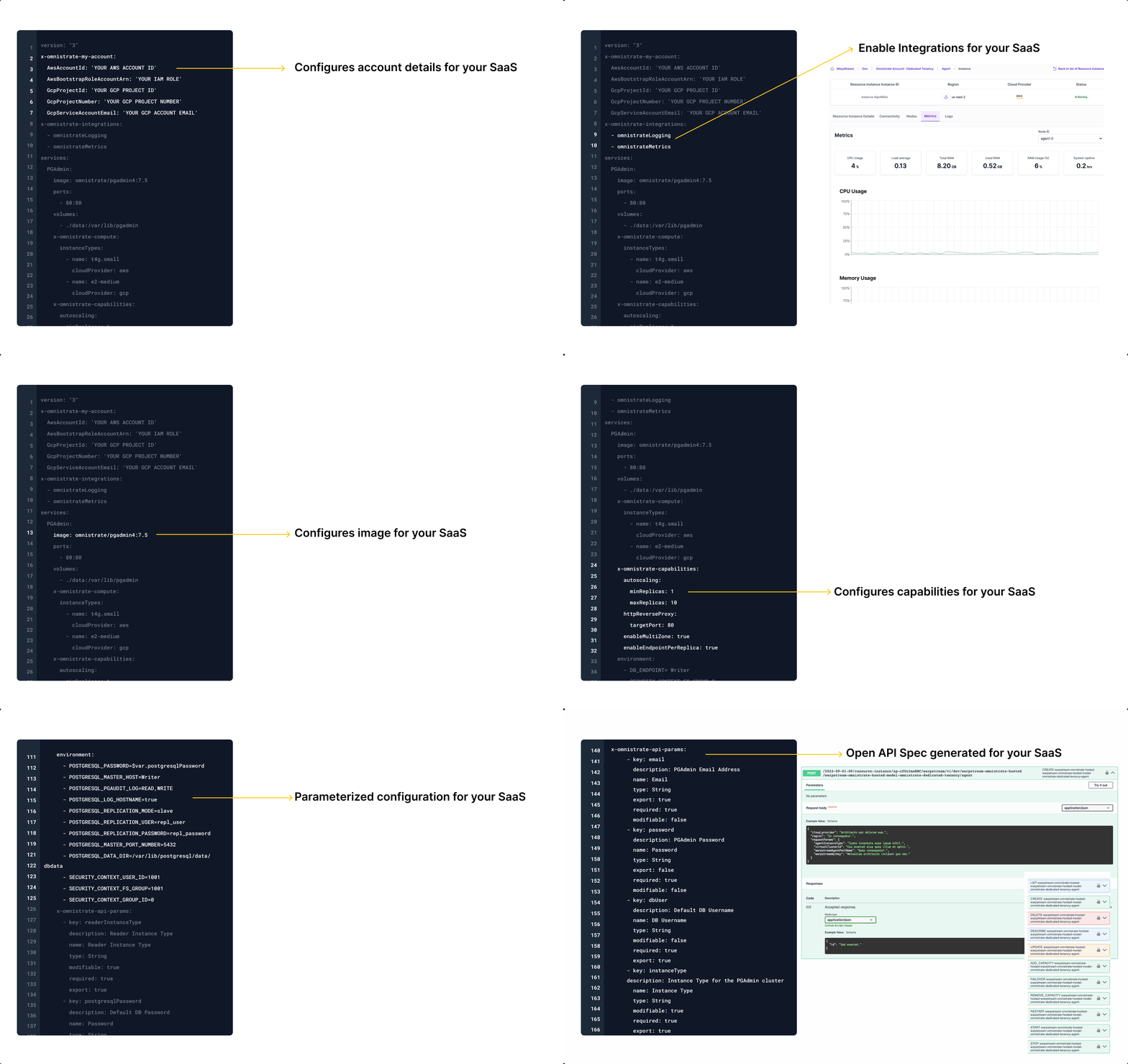
Build your Product using your compose specification
Create a Compose specification file and build your service:
omnistrate-ctl build --file omnistrate-compose.yaml --product-name "Your SaaS Product Name" --description "Your service description"
More Real-World Examples
List of examples demonstrating how to build various types of applications using Omnistrate. Each example provides step-by-step guidance, complete configuration files, and best practices for different use cases.
You can access the full examples index here.
Dive Deeper
Now that you have a working Compose-based SaaS Product, explore the build guides to add production-grade capabilities:
- Compose deployment strategy — Browse the Compose-specific strategy and specification reference
- Compose Troubleshooting — Diagnose failed Compose deployments and workflows
- Compose Specification Reference — Complete reference for all Omnistrate-specific Compose extensions (
x-omnistrate-*tags) - API Parameters — Let your customers configure deployments with custom parameters
- System Parameters — Use dynamic system-generated values in your Compose spec
- Deployment Models — Configure hosted, BYOC, or air-gapped deployment models
- Tenancy Types — Choose between shared, dedicated, or hybrid tenancy
- Action Hooks — Run custom logic during provisioning, scaling, or upgrades
- Resource Dependencies — Set up dependencies between resources for multi-component applications
Additional Resources
- Compose Documentation — The official documentation for Docker Compose
- Compose File Reference — Detailed guide to the Compose file format
- Docker Hub — Explore container images for use with your Compose specification