Nebius account onboarding with CTL
Use this guide when your hosted plan or BYOA plan deploys to Nebius.
Why Nebius is different
Nebius account configs are tenant-scoped. Instead of a single account-wide identity, Omnistrate expects one or more bindings inside the account config.
A binding is the combination of:
- a Nebius project ID,
- a Nebius service account ID,
- a Nebius public key ID, and
- the matching private key PEM.
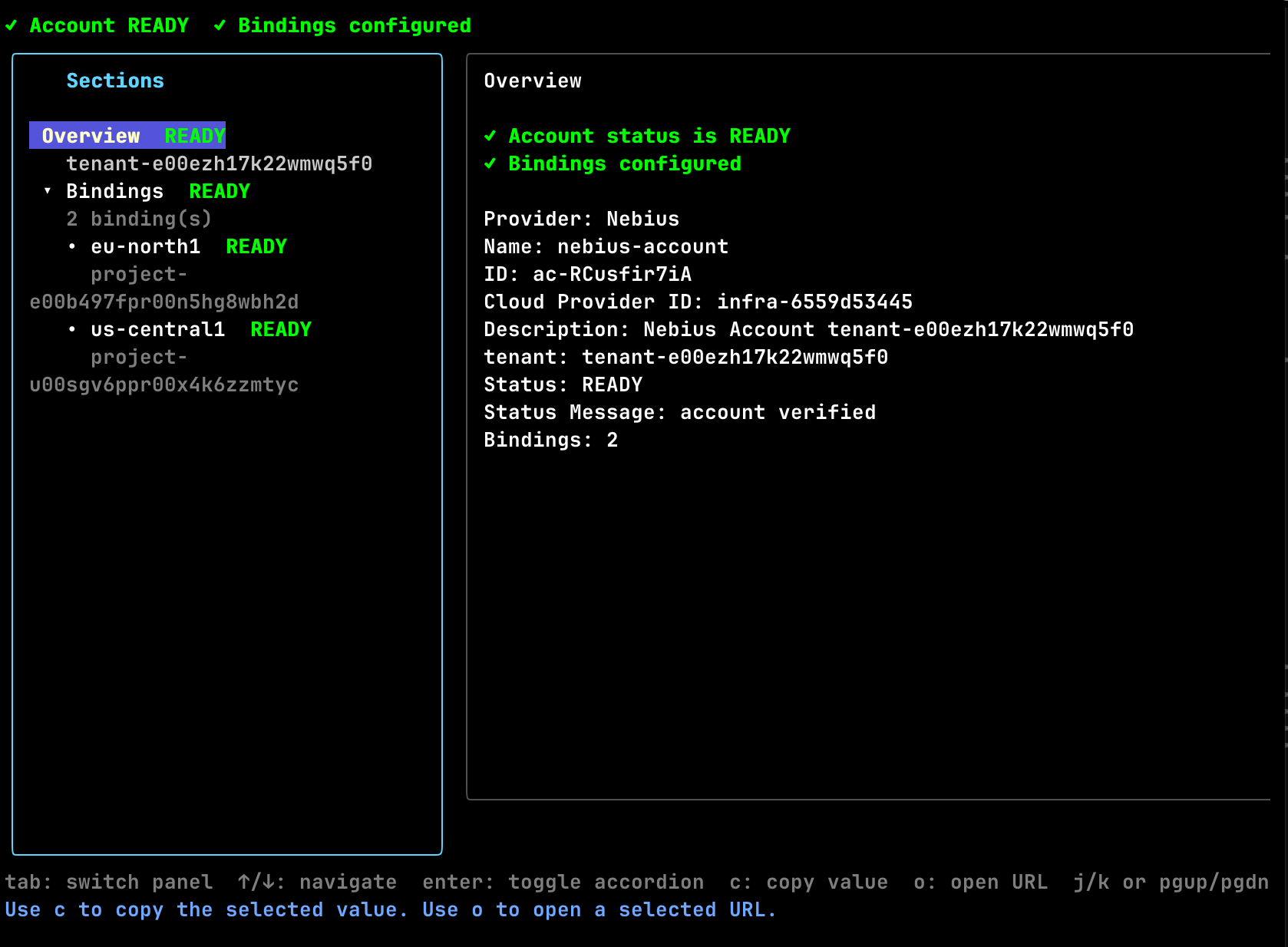
Each binding enables a specific region in your Nebius tenant for deployment after Omnistrate verifies it and confirms the service-account key belongs to the configured tenant. In practice this means:
- use one binding per Nebius project/region,
- keep all existing bindings in the file when adding a new region, and
- only deploy into regions whose bindings show
READYinaccount describe.
Prerequisites
- A Nebius tenant.
- One Nebius project for each region you want to enable.
- A human operator with enough Nebius IAM access to create service accounts and service-account authorized keys.
omnistrate-ctlinstalled and logged in.
Useful Nebius references:
Create the Nebius service account and key
Repeat this process for every Nebius project that you want to enable as a binding.
1. Create or choose the target project
Create one Nebius project per deployment region you want Omnistrate to use. Keep the project ID for the binding file.
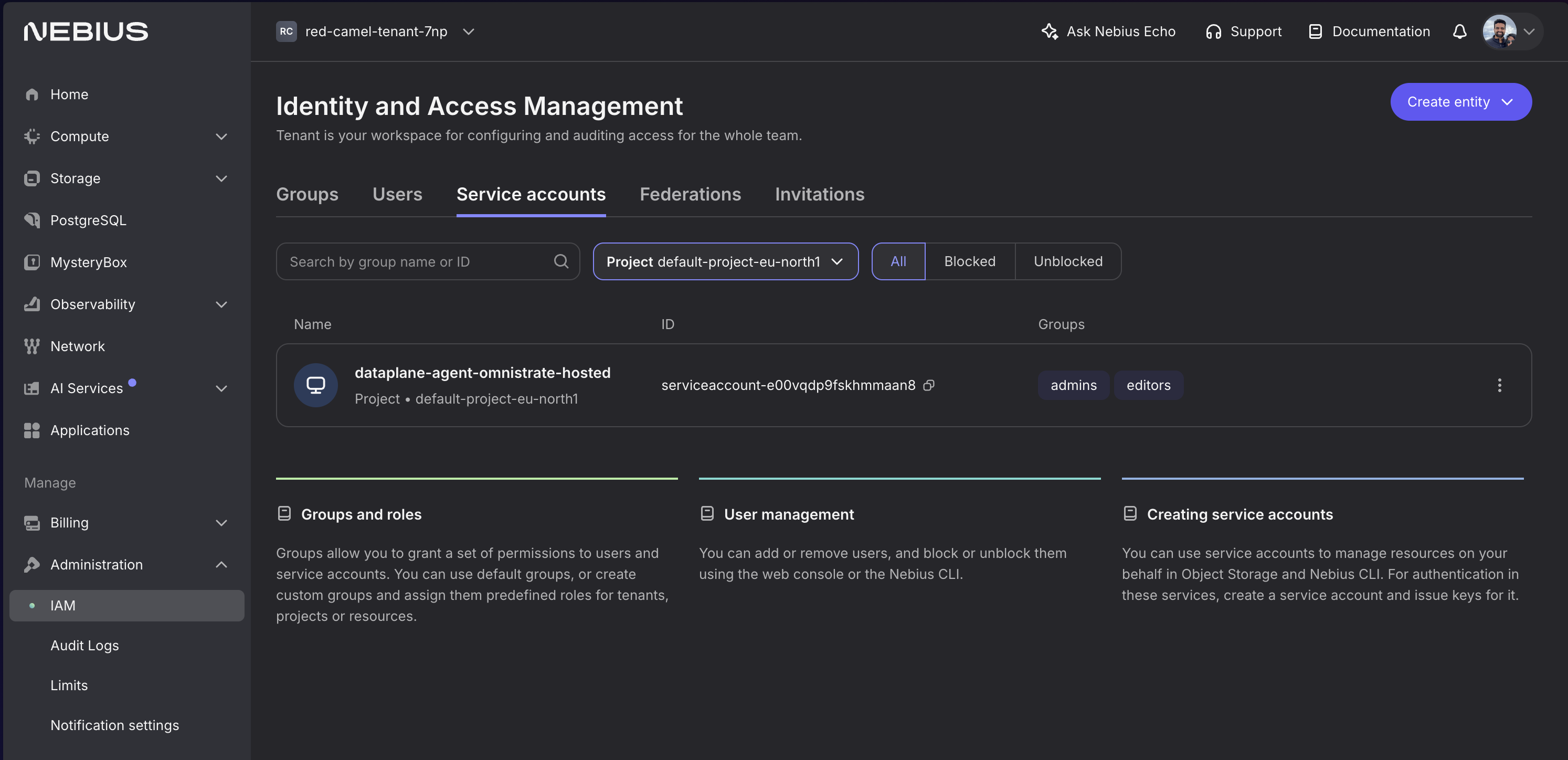
2. Create a service account in that project
In Nebius Console:
- Open the target project.
- Go to IAM or Service Accounts.
- Create a service account such as
omnistrate-eu-north1. - Save the service account ID.
3. Grant the service account project permissions
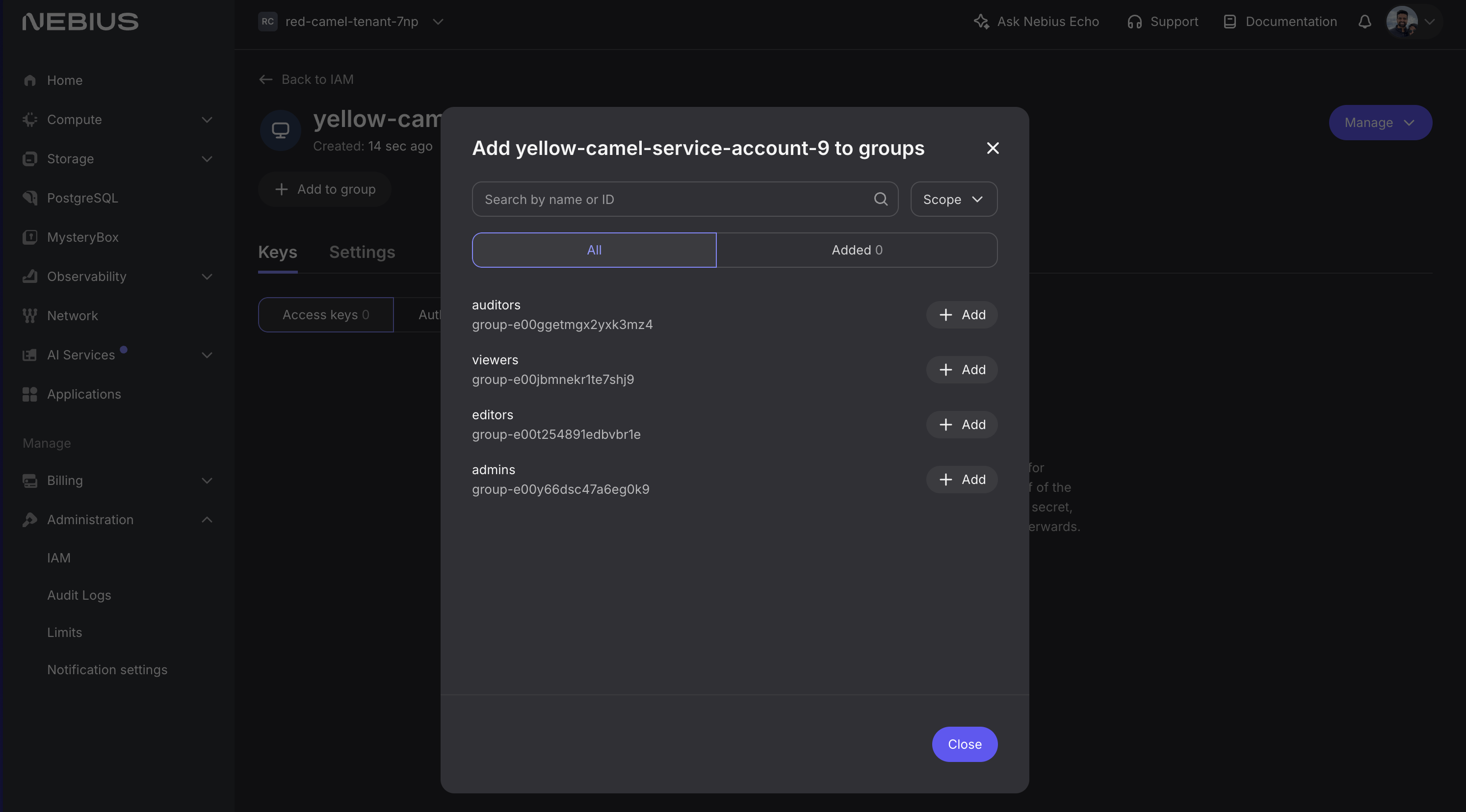
Add the service account to a project-level group or role set that can create and manage the infrastructure Omnistrate needs in that project. A project-scoped admin-style role is required to allow Omnistrate to manage your infrastructure.
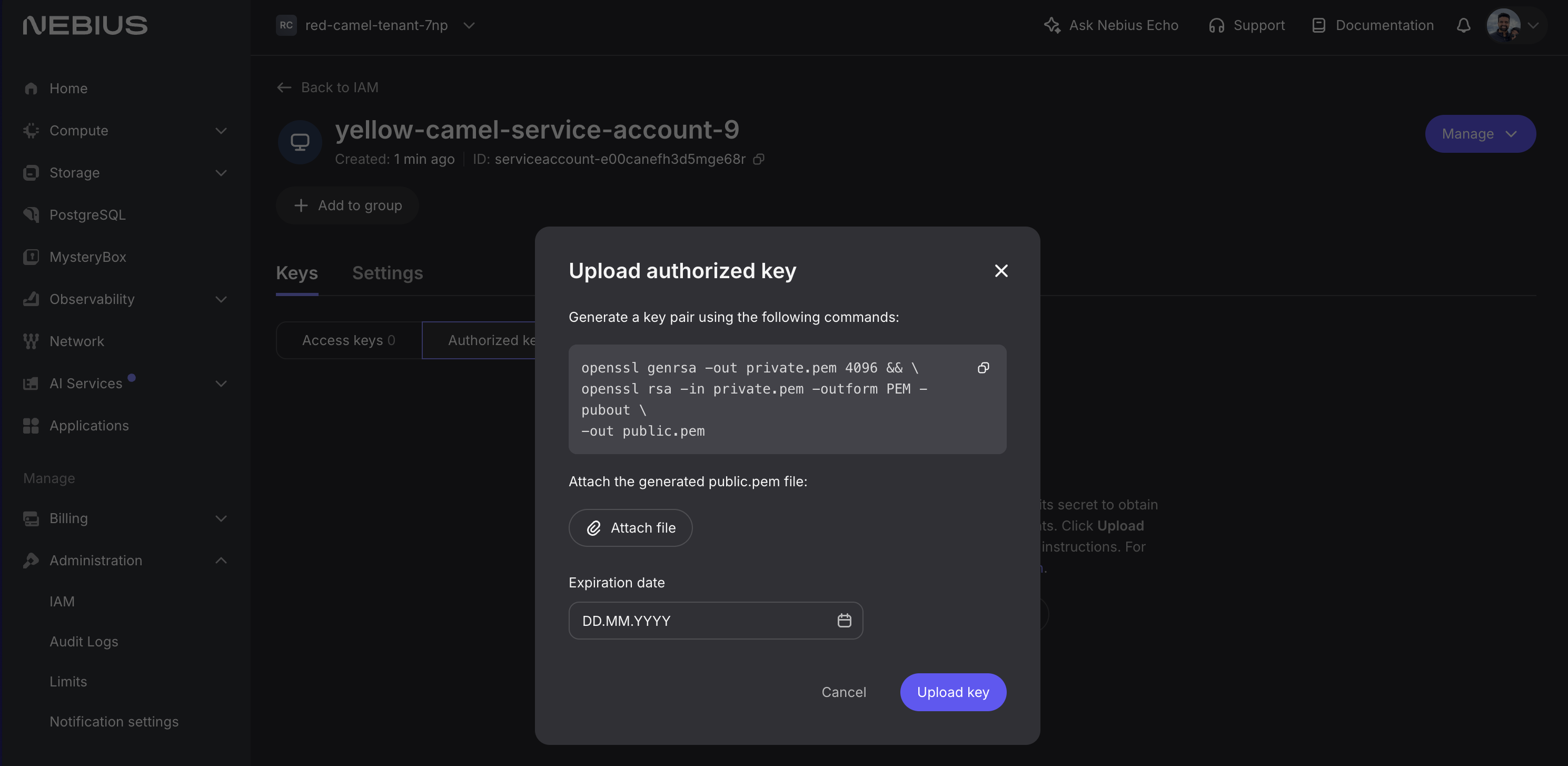
4. Create an authorized key for the service account
Upload a public key and save the matching private key PEM for the binding file.
Save these values for the binding:
- project ID
- service account ID
- public key ID
- private key PEM
Warning
Treat the private key PEM like any other long-lived secret. Store it outside source control. The recommended pattern in this guide is to reference a local file from the bindings YAML.
Create the Nebius bindings file
A bindings file can carry one or more Nebius bindings. Omnistrate resolves the region during verification, so you do not specify a region in the YAML.
bindings:
  - projectID: project-e00project
    serviceAccountID: serviceaccount-e00serviceacct
    publicKeyID: publickey-e00publickey
    privateKeyPEMFile: /path/to/private-key.pem

  - projectID: project-e00anotherproject
    serviceAccountID: serviceaccount-e00anotherserviceacct
    publicKeyID: publickey-e00anotherpublickey
    privateKeyPEMFile: /path/to/another-private-key.pem
Notes:
privateKeyPEMFileis recommended.privateKeyPEMalso works if you must inline the key material.- Keep the file as the full desired binding set. Updates replace the complete set, not just one entry.
If your plan also provisions Nebius resources through Terraform, see Nebius Terraform authentication.
Hosted flow
1. Create the hosted account config
omnistrate-ctl account create nebius-hosted \
  --nebius-tenant-id tenant-id \
  --nebius-bindings-file ./nebius-bindings.yaml
Because Nebius verification is direct, you can let the command wait for READY. Add --skip-wait only if you want to return immediately.
2. Inspect binding verification
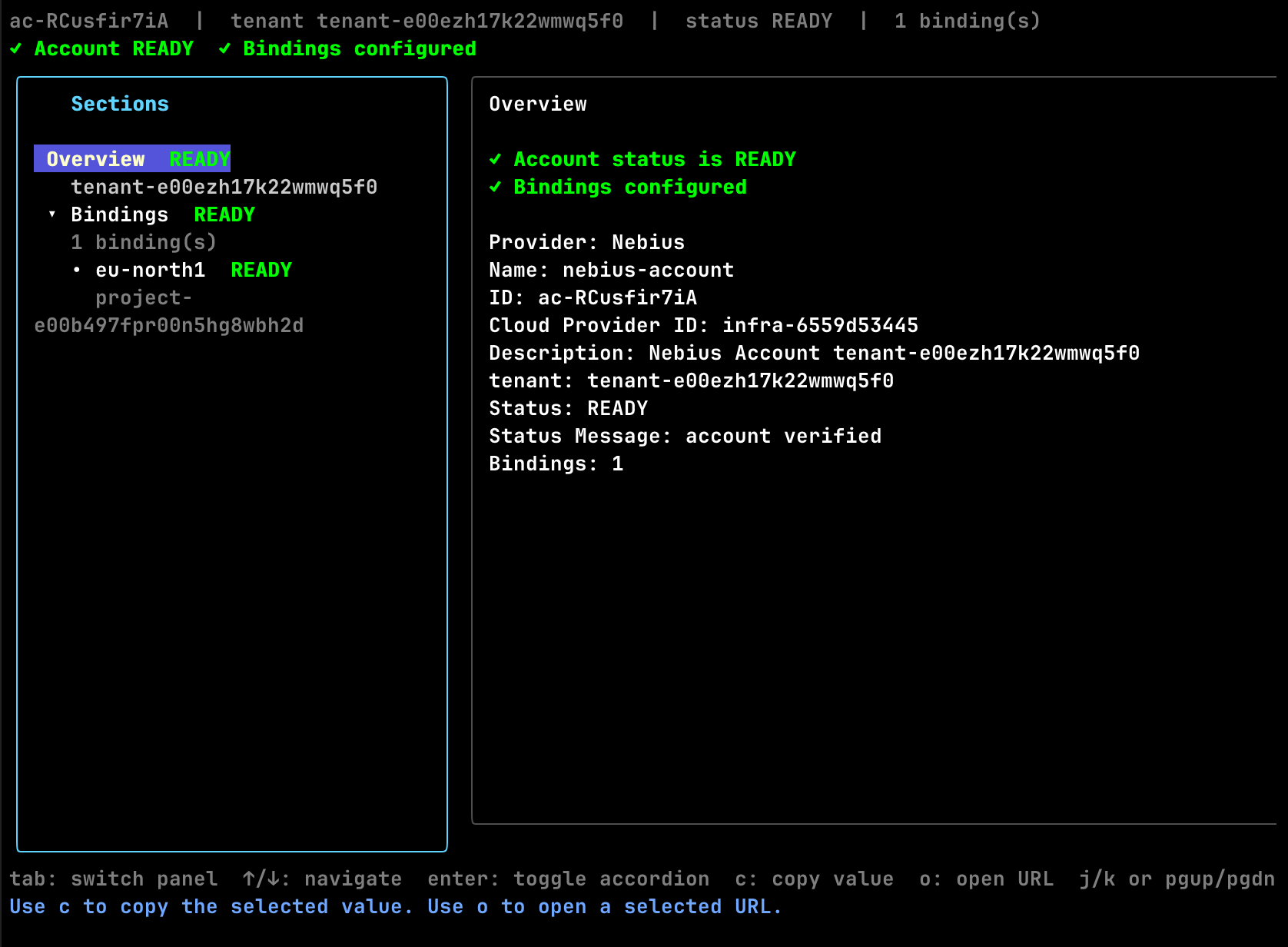
Only use regions whose bindings are READY.
3. Create the first hosted deployment
omnistrate-ctl instance create \
  --service <service> \
  --environment <environment> \
  --plan <hosted-plan> \
  --resource <resource> \
  --cloud-provider nebius \
  --region eu-north1 \
  --param-file ./params.json
The --region value must match one of the ready binding regions surfaced by account describe.
BYOA flow
1. Create the customer onboarding instance
omnistrate-ctl account customer create \
  --service <service> \
  --environment <environment> \
  --plan <byoa-plan> \
  --nebius-tenant-id tenant-e00ezh17k22wmwq5f0 \
  --nebius-bindings-file ./nebius-bindings.yaml
The command uses the calling user's subscription by default. If you need to onboard on behalf of another production subscription, add either --subscription-id <subscription-id> or --customer-email <email>.
2. Verify the customer onboarding instance
omnistrate-ctl account customer list --cloud-provider nebius
omnistrate-ctl account customer describe <customer-account-instance-id>
omnistrate-ctl account customer describe <customer-account-instance-id> -o json
Use the JSON output if you want the backing accountConfigID and the raw Nebius binding verification details.
3. Create the BYOA deployment
omnistrate-ctl instance create \
  --service <service> \
  --environment <environment> \
  --plan <byoa-plan> \
  --resource <resource> \
  --cloud-provider nebius \
  --region eu-north1 \
  --customer-account-id <customer-account-instance-id> \
  --param-file ./params.json
For BYOA plans, --customer-account-id is the onboarding instance ID returned by account customer create.
Author Nebius plans
Nebius compute options
services:
  - name: vllm
    compute:
      instanceTypes:
        - name: 8gpu-128vcpu-1600gb
          cloudProvider: nebius
          platform: gpu-h100-sxm
          configurationOverrides:
            GpuClusterID: computegpucluster-e00abcxfadyhcvpkdx
Notes:
- The instance type
nameis the Nebius preset. If you useapiParaminstead, that parameter must resolve to a Nebius preset at deploy time. platformis required on Nebius instance-type entries.configurationOverrides.GpuClusterIDis optional and Nebius-only. Use it when the preset must land in a specific Nebius GPU cluster.- Nebius GPU cluster placement is validated against the selected
platformand preset.
Nebius Terraform authentication
terraformConfigurations:
  configurationPerCloudProvider:
    nebius:
      terraformPath: /terraform/nebius
      serviceAccountID: serviceaccount-e00vqdp9fskhmmaan8
      publicKeyID: publickey-e00h9scsyy9mbefrjf
      privateKeyPEM: $secret.nebiusTerraformPrivateKey
      gitConfiguration:
        reference: refs/heads/main
        repositoryUrl: https://github.com/your-org/infra-repo.git
Notes:
- Prefer
$secret.<name>forprivateKeyPEM; Omnistrate resolves the secret before running Terraform. - When these fields are present, Omnistrate uses this service-account key for the Terraform resource instead of the default host-cluster Terraform identity.
- See Building your SaaS Product using Terraform and Plan Spec for the full schema.
Add a new region later
To enable another Nebius region, create another project-level binding and replace the full bindings file.
Hosted account update
BYOA backing account update
omnistrate-ctl account customer update <customer-account-instance-id> \
  --nebius-bindings-file ./nebius-bindings.yaml
After the update completes:
- Rerun
account describeoraccount customer describe. - Confirm the new binding reaches
READY. - Start deploying into the newly discovered region.
Warning
Nebius binding updates are full replacements. If your current file has two working bindings and you add a third, keep all three in the replacement file.
Examples
For an end-to-end workload example that builds and publishes a service plan, creates a GPU-backed instance, tests the external endpoint, and deletes the deployment again, see Deploy vLLM on Nebius.
Delete and offboard
Useful lifecycle commands:
# List all Nebius customer onboarding instances
omnistrate-ctl account customer list --cloud-provider nebius

# Delete a customer onboarding instance
omnistrate-ctl account customer delete <customer-account-instance-id>
For the offboarding order and cleanup rules, follow Account Offboarding.