Instance Breakpoints
Instance breakpoints let you pause a create workflow when a target resource is reached, inspect state, and then resume execution.
What this supports
- Breakpoints are currently supported for instance create workflows.
- You can define breakpoints by resource key or resource ID.
- When a breakpoint is hit, the workflow is paused until resumed.
- Breakpoint status is visible in:
omctl instance breakpoint listomctl instance debug(interactive TUI and JSON)- Breakpoints are deleted after the workflow completes.
Example setup
Use the following full Service Plan spec and save it as ./instance-breakpoints-spec.yaml:
# yaml-language-server: $schema=https://api.omnistrate.cloud/2022-09-01-00/schema/service-spec-schema.json
services:
  - name: serviceA
    description: Service A
    passive: true
    dependsOn:
      - serviceB
  - name: serviceB
    description: Service B
    passive: true
In this spec, serviceA depends on serviceB, so serviceB is created first.
1. Build and release product
omctl build -f ./instance-breakpoints-spec.yaml \
  --product-name 'TestBreakpoints' \
  --spec-type ServicePlanSpec \
  --release-as-preferred
2. Create instance with breakpoint
Set a breakpoint on serviceB during create:
omctl instance create \
  --cloud-provider aws \
  --environment dev \
  --service TestBreakpoints \
  --plan TestBreakpoints \
  --region us-east-2 \
  --resource serviceA \
  --breakpoints serviceB
3. List active breakpoints
Text output includes both resource id and key:
╭────────────────────────────────╮
│ id            key       status │
│────────────────────────────────│
│ r-POCvLQ9Bc5  serviceB  Hit    │
╰────────────────────────────────╯
JSON output:
4. Inspect paused workflow with debug
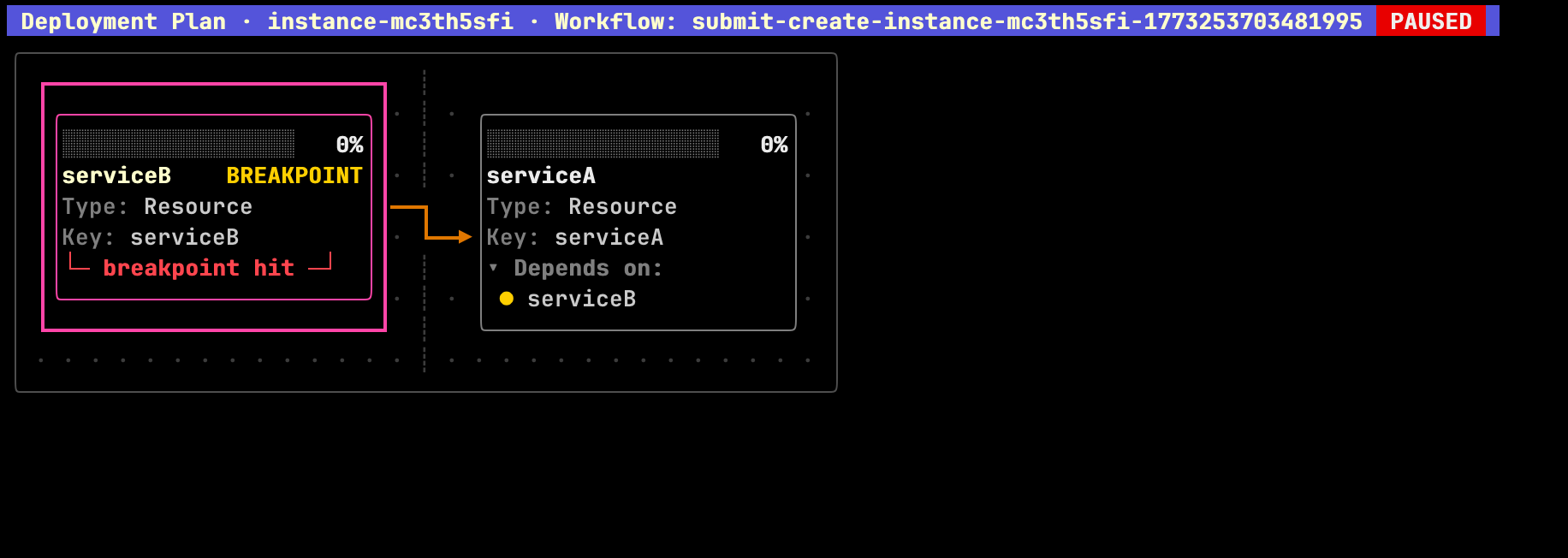
Interactive TUI
When a breakpoint is hit:
- Header shows workflow ID with
PAUSED. - Target resource card shows
BREAKPOINTandbreakpoint hit.
JSON view
Breakpoint status is available under:
planDag.breakpointByIdplanDag.breakpointByKeyplanDag.breakpointByName
Example:
{
  "instanceId": "instance-ckxvekao9",
  "planDag": {
    "workflowId": "submit-create-instance-ckxvekao9-1773256161588972",
    "breakpointById": {
      "r-POCvLQ9Bc5": "hit"
    },
    "breakpointByKey": {
      "serviceB": "hit"
    },
    "breakpointByName": {
      "serviceB": "hit"
    }
  }
}
5. Resume paused workflow
Resume with confirmation:
Confirmation includes both resource key and ID:
┃ Resume workflow submit-create-instance-ckxvekao9-1773256161588972 for instance instance-ckxvekao9?
┃ Breakpoint to resume: serviceB [r-POCvLQ9Bc5]
Skip confirmation:
6. Verify workflow completion
After resume, debug shows completed progress and no breakpoint maps:
Expected behavior:
progressById,progressByKey, andprogressByNameshowcompleted.breakpointById/breakpointByKey/breakpointByNameare no longer present.
You can also re-run breakpoint list to verify no active breakpoints remain:
Related commands
omctl instance create --breakpoints <resource-id-or-key>[,<resource-id-or-key>...]omctl instance breakpoint list <instance-id>omctl instance breakpoint resume <instance-id> [--force]omctl workflow resume <workflow-id>