Instance Breakpoints
Instance breakpoints let you pause a create workflow before a target resource is reconciled, inspect state, and then resume execution.
What this supports
- Breakpoints are currently supported for instance create workflows.
- You can define breakpoints by resource key or resource ID.
- You can optionally pause on supported resource events by using
<resource>:<event>|<event>. - When a breakpoint is hit, the workflow is paused until resumed.
- Breakpoint status is visible in:
omctl instance breakpoint listomctl instance debug(interactive TUI and JSON)- Breakpoints are deleted after the workflow completes.
Resource events
Without an event, a breakpoint pauses before the target resource is reconciled. Event-specific breakpoints pause at supported lifecycle points inside a resource reconciliation.
| Resource type | Supported events |
|---|---|
| Helm | StartHelmInstall, CompleteHelmInstall, FailHelmInstall |
| Terraform | StartTerraformPlan, CompleteTerraformPlan, FailTerraformPlan, StartTerraformApply, CompleteTerraformApply, FailTerraformApply |
| Other resource types | No resource events |
Event-specific breakpoints are checked in the resource reconciliation timeline:
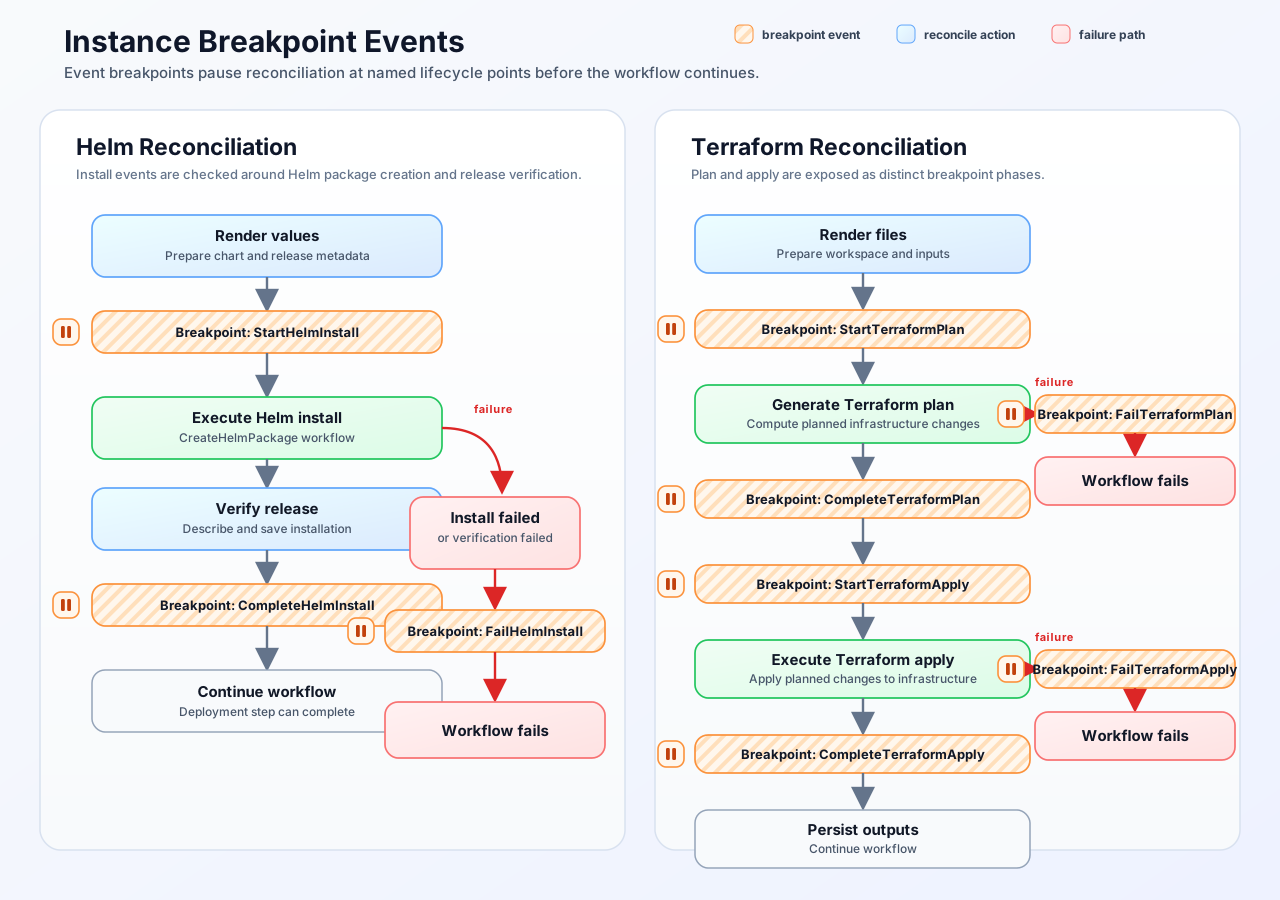
If a configured breakpoint matches one of these event names, Omnistrate pauses at that point before moving to the next step.
Example setup
Use the following full Service Plan spec and save it as ./instance-breakpoints-spec.yaml:
# yaml-language-server: $schema=https://api.omnistrate.cloud/2022-09-01-00/schema/service-spec-schema.json
services:
  - name: serviceA
    description: Service A
    passive: true
    dependsOn:
      - serviceB
  - name: serviceB
    description: Service B
    passive: true
In this spec, serviceA depends on serviceB, so serviceB is created first.
1. Build and release product
omctl build -f ./instance-breakpoints-spec.yaml \
  --product-name 'TestBreakpoints' \
  --spec-type ServicePlanSpec \
  --release-as-preferred
2. Create instance with breakpoint
Set a breakpoint on serviceA during create. Because serviceA depends on serviceB, the workflow reconciles serviceB first and then pauses before reconciling serviceA:
omctl instance create \
  --cloud-provider aws \
  --environment dev \
  --service TestBreakpoints \
  --plan TestBreakpoints \
  --region us-east-2 \
  --resource serviceA \
  --breakpoints serviceA
To pause on Helm install events, include the event names after the resource key or ID:
omctl instance create \
  --cloud-provider aws \
  --environment dev \
  --service TestBreakpoints \
  --plan TestBreakpoints \
  --region us-east-2 \
  --resource serviceA \
  --breakpoints chart:StartHelmInstall|FailHelmInstall
For Terraform resources:
omctl instance create \
  --cloud-provider aws \
  --environment dev \
  --service TestBreakpoints \
  --plan TestBreakpoints \
  --region us-east-2 \
  --resource serviceA \
  --breakpoints tf:StartTerraformPlan|CompleteTerraformPlan|FailTerraformPlan|StartTerraformApply|CompleteTerraformApply|FailTerraformApply
3. List active breakpoints
Text output includes both resource id and key:
╭────────────────────────────────────────────╮
│ id            key       event             status │
│────────────────────────────────────────────│
│ r-Tz8WmKj4Xn  serviceA  StartHelmInstall  Hit    │
╰────────────────────────────────────────────╯
JSON output:
4. Inspect paused workflow with debug
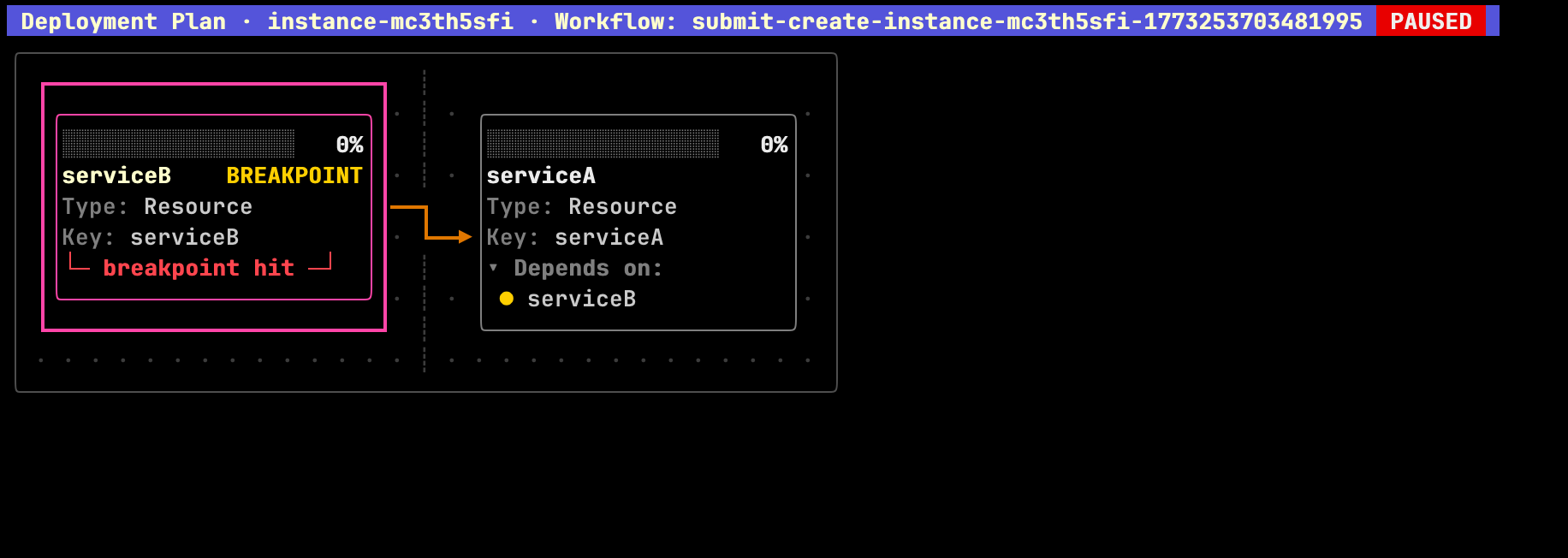
Interactive TUI
When a breakpoint is hit:
- Header shows workflow ID with
PAUSED. - Target resource card shows
BREAKPOINTandbreakpoint hit.
JSON view
Breakpoint status is available under:
planDag.breakpointByIdplanDag.breakpointByKeyplanDag.breakpointByNameplanDag.breakpointEventsByIdplanDag.breakpointEventsByKeyplanDag.breakpointEventsByName
Example:
{
  "instanceId": "instance-ckxvekao9",
  "planDag": {
    "workflowId": "submit-create-instance-ckxvekao9-1773256161588972",
    "breakpointById": {
      "r-Tz8WmKj4Xn": "hit"
    },
    "breakpointByKey": {
      "serviceA": "hit"
    },
    "breakpointByName": {
      "serviceA": "hit"
    },
    "breakpointEventsByKey": {
      "serviceA": {
        "StartHelmInstall": "hit"
      }
    }
  }
}
5. Resume paused workflow
Resume with confirmation:
Confirmation includes both resource key and ID:
┃ Resume workflow submit-create-instance-ckxvekao9-1773256161588972 for instance instance-ckxvekao9?
┃ Breakpoint to resume: serviceA [r-Tz8WmKj4Xn]
Event-specific breakpoints include the event:
Skip confirmation:
6. Verify workflow completion
After resume, debug shows completed progress and no breakpoint maps:
Expected behavior:
progressById,progressByKey, andprogressByNameshowcompleted.breakpointById/breakpointByKey/breakpointByNameare no longer present.
You can also re-run breakpoint list to verify no active breakpoints remain:
Related commands
omctl instance create --breakpoints <resource-id-or-key>[:<event>[|<event>...]][,<resource-id-or-key>...]omctl instance breakpoint list <instance-id>omctl instance breakpoint resume <instance-id> [--force]omctl workflow resume <workflow-id>